
Protecting Applications with Envelope Plus (Windows V3 Engine)
Sentinel LDK Envelope with the Windows V3 engine includes Envelope Plus, a premium, subscription-based protection feature that provides strong intellectual property protection and enhanced copy protection.
Envelope Plus protects selected functions within a compiled native Windows application using advanced technologies such as code obfuscation, anti-tamper, and anti-trace. This function-level protection complements the standard Envelope protection applied to the entire application. Envelope Plus operates on an already compiled application without requiring any changes to the build process or source code.
How does Envelope Plus work?
Before protecting an application with Envelope Plus, ensure that the following requirements are met:
> Sentinel LDK Envelope with the Windows V3 Engine (x86 and x64), which is the default engine for Envelope
> A compiled Windows application (32 bit or 64 bit executable or DLL)
>A matching Program Database (PDB) file containing debugging symbols
> A Sentinel Developer key with a license that includes the Envelope Plus feature
NOTE Without a Sentinel Developer key that includes a license for the Envelope Plus feature, Envelope Plus can be used with the DEMOMA Batch Code. In this case, although the additional protection is disabled, it allows verification that the application is compatible with Envelope Plus protection.
Once enabled, Envelope Plus protects selected functions through a process that analyzes and transforms compiled application code.
The following diagram illustrates the workflow for how Envelope Plus processes and protects application functions.
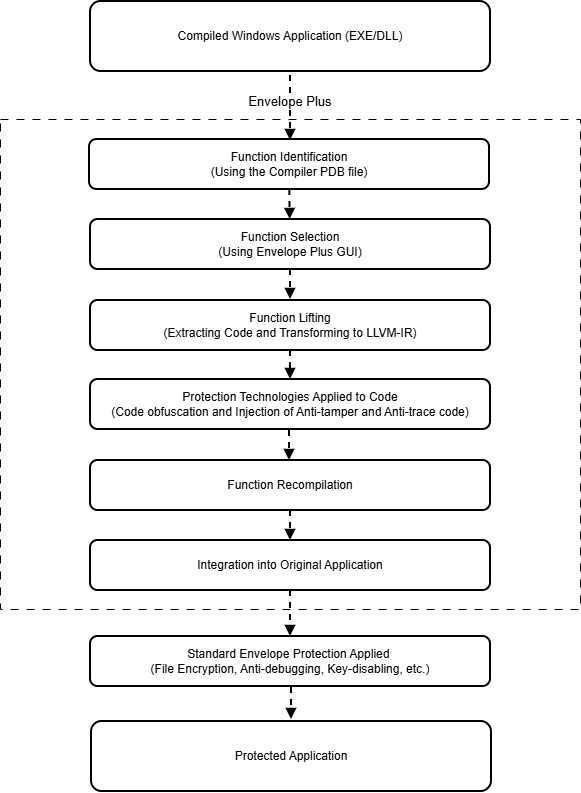
The following sequence describes each stage in the Envelope Plus workflow:
1.Function identification: Envelope Plus identifies functions in the compiled application using debugging symbol information stored in a PDB file. If the PDB file is not automatically detected, you are prompted to select the appropriate file.
2.Function selection: Envelope Plus lists the detected functions in the Envelope Plus interface, allowing you to review the list and select the functions that you want to protect.
3.Function lifting: The selected functions are extracted from the application and transformed into LLVM‑IR.
4.Protection technologies applied to code: Protection technologies are applied to the lifted functions. By default, the following protection techniques are applied to protected functions:
•Obfuscation makes the application logic difficult to understand or reconstruct.
•Anti-tamper protection detects and prevents unauthorized modification of protected code.
•Anti-trace protection makes debugging and runtime analysis significantly more difficult.
These techniques strengthen the code against reverse engineering, modification, and runtime analysis. You can also use a YAML configuration file to customize how the selected functions are protected.
5.Function recompilation: After protection is applied, the protected functions are recompiled.
6.Integration into the original application: After recompilation, the protected functions are merged back into the original application.
NOTE If a selected function cannot be lifted during transformation, an error is generated and Envelope Plus continues protecting the remaining functions. The application remains functional, but the failed functions are not protected.
Customizing Protection Settings via YAML
Envelope Plus behavior can be customized using a YAML-based protection configuration file. The YAML file defines rules that determine how protection techniques are applied to functions selected in the Envelope Plus interface. This allows you to apply stronger protection to highly sensitive functions while reducing the impact on performance for other parts of the application.
During the protection process, Envelope Plus applies the YAML rules to the functions that were selected in the Envelope Plus interface. The rules determine which protection techniques are applied to each selected function. For example, stronger protection can be applied to highly sensitive functions, while less critical functions can use lighter protection settings to minimize performance impact.
When using a YAML configuration file, the following behaviors apply:
>Symbol entries support wildcard patterns, enabling rules to match multiple functions.
>If multiple symbol patterns match the same function, only the first matching rule is applied.
>Unsupported YAML fields produce an error.
>Symbol rules that do not match any lifted function generate a warning.
Using YAML customization allows you to control how protection settings are applied to selected functions, making it easier to apply consistent protection policies across multiple builds or applications.
Sample YAML File:
settings:
  globalObfuscationLevel: 1
  globalAntiTamperLevel: 1
  globalAntiTraceLevel: 1
symbols:
  "*ain":
    - "obfuscation.off"
    - "anti-tamper-coverage.off"
    - "anti-tamper.off"
    - "anti-trace.off"
  "test_method":
    - "obfuscation.on"
    - "anti-tamper-coverage.on"
    - "anti-tamper.on"
    - "anti-trace.on"
Performance Considerations
Protected functions undergo code transformation and additional runtime checks, which can increase execution time compared to the original implementation. The performance impact depends on the selected protection level and the number of functions protected. For best results, protect only a small number of functions that contain sensitive or critical logic and are not performance-critical. The impact should be assessed by a developer who is familiar with the application code and can determine which functions are appropriate for protection.
Additionally, the lifting process introduces runtime overhead, so protected functions may experience performance degradation even if some protection techniques are disabled.
Limitations
The following limitations apply when using Envelope Plus:
>Functions with exception handlers cannot be protected. Such functions cannot be lifted and therefore cannot be selected for protection. They appear disabled in the GUI.
>Constant protection is not supported. When using Envelope Plus, constant protection during obfuscation does not apply; only the function code can be protected.
Related Topics
Envelope Plus Settings (Windows V3 Engine)