
End-User Keys
Two types of Sentinel protection keys are available:
>The Sentinel HL key is a physical USB or ExpressCard key that connects to a computer, or a chip that is embedded in the computer.
>The Sentinel SL key is a software-based key that locks your software to a specific machine. Your software and the user license are locked to the Sentinel protection key that you select.
Sentinel HL Keys
All Sentinel HL keys—with the exception of Sentinel HL Basic keys—contain internal read/write memory. You can use the memory to do any of the following:
>Control access to specific software modules and/or packages
>Assign a unique code to each software user
>Store licenses from your own licensing schemes
>Save passwords, program code, program variables, and other data
Sentinel HL keys are distributed with your software to end users. The keys connect to the end users’ computers. A variety of Sentinel HL keys are available to suit your requirements. Sentinel HL keys are available in either of two configurations:
>Sentinel HL (HASP configuration) keys: These keys are fully compatible with software that requires the older HASP HL keys.
NOTE Sentinel HL (HASP configuration) keys can be upgraded in the field to Sentinel HL (Driverless configuration) keys. For more information, see Upgrading Sentinel HL Keys.
>Sentinel HL (Driverless configuration) keys: These keys provide several advantages over Sentinel HL (HASP configuration) keys:
•(On a Windows machine) Employ HID drivers instead of HASP key drivers. (HID drivers are an integral part of the Windows operating system.) In many cases, it is possible to use these keys without installing any additional support software.
•(On a Windows machine) Support the use of "AppOnChip" functionality. With AppOnChip, code fragments of selected functions in the protected application are protected from an attacker's eyes by storing them as encrypted data. The code fragments are only decrypted and executed inside the HL key. This provides significantly enhanced security for the application.
•(On a Linux machine) In many cases, it is possible to use these keys without installing any additional support software.
•Support a higher number of Features.
•Provide larger on-key memory space.
•All Driverless keys (except for Basic keys) support a virtual clock for time-based licenses.
•All Driverless keys (except for Basic keys) support concurrency (network-based licenses).
Sentinel HL keys offer the highest level of security. In order for a user to access your software, and for it to function correctly, the key must be accessible by the application. Furthermore, Sentinel LDK uses LicenseOnChip technology to protect Sentinel HL keys against license tampering.
Sentinel HL keys also have the advantage of portability. This means that the key can be moved from one computer to another. Software may therefore be installed on multiple computers but will only run if the key is connected and authenticated by the software.
NOTE A Sentinel HL key can be accessed using a virtual connection. For more information, see Virtual Connection of HL Keys.
NOTE Sentinel LDK continues to support the older HASP HL keys. All references to Sentinel HL keys in this document and other Sentinel LDK documents can be understood to include HASP HL keys unless the context of the reference clearly states otherwise.
Benefits of Sentinel HL Key Protection
Sentinel HL key protection provides the strongest level of protection against piracy. The correct functionality of the software depends on the internal logic of the Sentinel HL key, which is virtually tamper-proof.
In addition, Sentinel HL key protection:
>Offers the strongest enforcement for license terms, which are stored and protected inside the Sentinel HL key.
>Enables portability—the software can be used on any computer to which the Sentinel HL key is connected.
>Does not require transaction with the software vendor to enable activation of the Product.
Maximum Number of Features in a Sentinel HL Key
While the number of Features that can be written to a Sentinel SL key is unlimited, each Sentinel HL key can contain a certain maximum number of Features, depending on:
>the type of HL key
>the number of Products among which the Features are distributed
>the complexity of the license type defined in each Feature:
•Lowest complexity: Perpetual HL
•Medium complexity: Perpetual HL + SL, Expiration Date
•Highest Complexity: Execution Count,
For example, a Sentinel HL Max (Driverless configuration) key can contain:
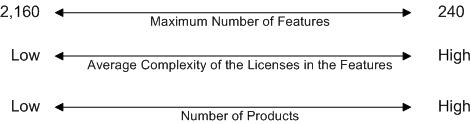
This diagram illustrates that:
>As you increase the number of higher-complexity license types on the key, the maximum number of Features that the key can contain decreases.
>As you increase the number of Products on the key, the maximum number of Features that the key can contain decreases.
For information on the range of Features that each Sentinel HL key can contain, see the Sentinel HL Data Sheet.
NOTE In Sentinel HL (Driverless configuration) keys, Features are stored in dynamic memory space. This space is shared between application data (the space available to you for your applications) and Features. All space that is not utilized for Features can be used for application data. For more information, see Defining Protection Key Memory Data.
Upgrading Sentinel HL Keys
The configuration of Sentinel HL keys can be upgraded before or after delivery to customers as follows:
>Sentinel HL (HASP configuration) keys can be upgraded to Sentinel HL (Driverless configuration) keys.
>Sentinel HL (Driverless configuration) standalone (non-Net) keys can be converted to Sentinel HL (Driverless configuration) network keys.
Each of these upgrades is described below.
This section also describes Differences Between Sentinel HL (Driverless configuration) keys and Sentinel HASP keys.
Upgrading a Sentinel HL Key to Driverless Configuration
A Sentinel HL (HASP configuration) key that was previously delivered to a customer can be upgraded to a Sentinel HL (Driverless configuration) key in the field. In Driverless configuration, this key will employ HID drivers instead of HASP key drivers. (HID drivers are an integral part of the operating system.) As a result:
>The key is less subject to issues related to operating system upgrades.
>The key may no longer require the presence of Sentinel LDK Run-time Environment.
All of the licenses and key memory that existed in the Sentinel HL (HASP configuration) key will continue to exist in the key after the upgrade.
NOTE An application that is protected with version 6.3 or 6.4 of Sentinel LDK, Licensing API libraries and/or Envelope will work correctly after the Sentinel HL (HASP configuration) key that licenses the application is upgraded to the Driverless configuration. However, the requirement for the Run-time Environment will not change.
NOTE Given the following situation:
>An application is protected with version 6.3 or 6.4 of Sentinel Licensing API libraries and/or Envelope.
>The Sentinel HL (HASP configuration) key that licenses the application is upgraded to the Driverless configuration.
The application will work correctly after the upgrade. However, the requirement for the presence of the Run-time Environment does not change.
The tables that follow summarize the requirements for working with HL keys.
Standalone HL Keys
| Version of Licensing API or Envelope used to protect the application (lower of the two) | HASP HL key or Sentinel HL (HASP configuration) key | Sentinel HL (Driverless configuration) key |
|---|---|---|
| HASP SRM, Sentinel HASP, or Sentinel LDK v.6.0 or v.6.1 | Requires Run-time Environment from same (or later) version that was used to protect the application | Not supported. See the warning below. |
| Sentinel LDK v.6.3 | Requires Run-time Environment from Sentinel LDK v.6.3 or later | |
| Sentinel LDK v.6.4 | Requires Run-time Environment from Sentinel LDK v.6.4 or later | |
| Sentinel LDK v.7.0 or later | Requires Run-time Environment from Sentinel LDK v.7.0 or later | Under Windows, use of Run‑time Environment (from Sentinel LDK v.7.0 or later) is optional. |
Net and NetTime HL Keys
| Version of Licensing API or Envelope used to protect the application (lower of the two) | HASP HL key or Sentinel HL (HASP configuration) key | Sentinel HL (Driverless configuration) key |
|---|---|---|
| HASP SRM, Sentinel HASP, or Sentinel LDK v.6.0 or v.6.1 | On the machine where the HL key is connected: Requires Run-time Environment from same (or later) version that was used to protect the application | Not supported. See the warning below. |
| Sentinel LDK v.6.3 | On the machine where the HL key is connected: Requires Run-time Environment from Sentinel LDK v.6.3 or later | |
| Sentinel LDK v.6.4 | On the machine where the HL key is connected: Requires Run-time Environment from Sentinel LDK v.6.4 or later | |
| Sentinel LDK v.7.0 or later | On the machine where the HL key is connected: Requires Run-time Environment from Sentinel LDK v.7.0 or later | |
The following limitations apply:
>The application must be protected using version 6.4 or later of Sentinel Licensing API libraries and/or Envelope. (For Sentinel HL Net keys and Sentinel HL NetTime keys, use version 7.0 or later.)
>You must be using version 6.4 or later of Sentinel LDK-EMS or License Generation API to generate the Product that upgrades the HL key. (For Sentinel HL Net keys and Sentinel HL NetTime keys, use version 7.0 or later.)
>The firmware on the Sentinel HL key will be automatically updated as part of the upgrade process.
>After upgrade, Sentinel HL (Driverless configuration) keys will not be visible in Admin Control Center if the Run-time Environment is earlier than:
• version 6.50 (Sentinel LDK v.6.3) — for standalone keys
•version 6.60 (Sentinel LDK v.7.0) — for Net and NetTime keys
An application that is protected with version 6.3 of Sentinel LDK, Licensing API libraries and/or Envelope will work correctly after the Sentinel HL (HASP configuration) key that licenses the application is upgraded to the Driverless configuration. However, the requirement for the presence of the Run-time Environment does not change.
**WARNING**
An application that is protected with version 6.1 or earlier of Sentinel LDK libraries, Licensing API libraries and/or Envelope will stop working if the Sentinel HL (HASP configuration) key that licenses the application is upgraded to the Driverless configuration.
The upgrade process for the Sentinel HL key is not reversible.
Upgrade Requirements
The machine that is used to upgrade a Sentinel HL (HASP configuration) key to a Sentinel HL (Driverless configuration) key must contain a Sentinel LDK Run-time Environment that satisfies the following requirements:
| Sentinel HL (HASP configuration) key to upgrade | Required Run-time Environment |
|---|---|
| Standalone key that contains license information (Features and Products) | Version 6.56 or later |
| Net or NetTime key that contains license information (Features and Products) | Version 6.60 or later |
| Any HL key that contains no license information (Features and Products) AND the license update used to upgrade the key contains no license information (Features and Products). Both the key and the license update can contain memory data. | No special version requirements |
Upgrade Process
To upgrade a Sentinel HL (HASP configuration) key to Sentinel HL (Driverless configuration) key:
>Create a
The Upgrade to Driverless attribute is ignored if it applied to Sentinel HASP keys or to Sentinel HL (Driverless configuration) keys. Similarly, the attribute is ignored if is applied to an SL AdminMode key, SL UserMode key, or SL Legacy key. No error message is generated.
The Product that contains the Upgrade to Driverless attribute can be created using Sentinel LDK-EMS
To upgrade a Sentinel HL Basic key from HASP configuration to Driverless configuration:
>On the machine where the Sentinel HL Basic key is connected, use RUS to collect information regarding the key. Use the resulting C2V file with Sentinel License Generation API to generate a V2C file that uses the Upgrade to Driverless attribute to upgrade the key.
Apply the V2C file to the Sentinel HL Basic key to be upgraded.
Converting a Sentinel HL Standalone Key to a Network Key
This topic does not apply to Sentinel HL Basic keys.
The table that follows describes the terminology used in this section.
Sentinel HL standalone keys can be updated, before or after delivery to end users, to Sentinel HL concurrency-enabled keys, and thus provide practically the same network functionality as Sentinel HL Net or NetTime keys.
The only difference between a Sentinel HL concurrency-enabled key and a Sentinel HL Net or NetTime key is the manner in which you are charged for network seat licenses. Each Net or NetTime key is provided with a number of network seat licenses, based on the type of key. For HL concurrency-enabled keys, network seat licenses that you provide to your customers are deducted from the HL Pool of Seats in your Sentinel LDK Master license. This is similar to the way network seats are charged for Sentinel SL keys.
You update a Sentinel HL standalone key to a Sentinel HL concurrency-enabled key simply by assigning concurrency to a Feature on the key. When this occurs, the License Manager checks the firmware version of the key and may upgrade the firmware. (For more information on firmware upgrades, see the description of firmware in the Sentinel LDK Release Notes.)
The conversion can only occur if License Manager v.7.3 or later is present on the machine where the Sentinel HL key is connected.
NOTE When you update a Sentinel HL standalone key to a Sentinel HL concurrency-enabled key, you must also ensure that the Sentinel LDK Run-time Environment is installed on the machine where the key is connected. For more information, see Situations That Require Sentinel LDK Run-time Environment.
Note the following:
>Feature ID 0 for a Sentinel HL concurrency-enabled key shows the key as a NET key with unlimited concurrency as long as any other Feature on the key requires concurrency. If the requirement for concurrency are removed from the key, Feature ID 0 will show the key as a standalone key.
>In Sentinel License Generation API, you can prevent the upgrade of the Firmware for a Sentinel key when you update a license. However, if the existing Firmware on the key does not support the functionality in the update you are attempting to perform, the update will fail as a result. For more information, see the Sentinel License Generation API Reference.
>All Sentinel HL (Driverless configuration) key (except for HL Basic keys) will be shown as capable devices for licenses that require concurrency.
Sentinel HL (HASP configuration) standalone keys can be upgraded and updated to Sentinel HL (Driverless configuration) concurrency-enabled keys in a single update operation. Upgrade the key to the Driverless configuration as described earlier in this section, and at the same time assign concurrency to a Feature on the key.
Differences Between Sentinel HL (Driverless configuration) keys and Sentinel HASP keys
There is differences between Driverless keys and HASP keys when applying license update files (V2C or V2CP files, all referred to below as V2C updates).
>For HASP keys:
Sentinel LDK does not support applying a given V2C update multiple times. If the process of applying a V2C update to a HASP key is interrupted before completion, an additional attempt to apply the same V2C update will fail.
>For Driverless keys:
A given V2C update can be applied multiple times. After the first successful application of the V2C update, any additional attempts to apply the V2C update are simply ignored. If the process of applying a V2C update to a Driverless key is interrupted before completion, you can attempt to apply the same V2C update additional times until it succeeds.
However: If the customer uses the same C2V file to generate two different V2C updates, then after applying the first V2C update, the second V2C update might be applied partially to the Driverless key. Thales recommends that customers make sure that a given C2V file is only submitted to the vendor once to avoid this issue.
Sentinel SL Keys
Sentinel SL keys are virtual, software-based keys that reside in the secure storage of a specific computer. Sentinel SL keys provide the same functionality as Sentinel HL keys, without requiring physical distribution.
Sentinel SL keys are patterned on the functionality of Sentinel HL keys. However, the data is located in the secure storage of the computer on which the Sentinel SL key resides.
After your software is installed on a computer, the end user typically enters a Product Key that is sent, via the Internet or by file transfer, to Sentinel LDK-EMS, together with the fingerprint of the machine. Sentinel LDK-EMS confirms that the Product Key has not been used to activate the software on more than the permitted number of machines—as determined by you—then sends back the Sentinel SL key, which is installed on the end user’s machine. This process is also used for updating license terms.
The following types of Sentinel SL keys exist:
>SL Legacy - SL keys that were generated with versions of Sentinel HASP prior to Sentinel LDK v.6.0
>SL AdminMode - SL keys that provide the highest level of security and functionality
>SL UserMode - SL keys that provide a greater level of flexibility under certain circumstances
Benefits of Sentinel SL Key Protection
With Sentinel SL key protection:
>Product
•Product activation is instantaneous. End users can immediately start using the software with its fully-licensed functionality.
•The activation process for end users is convenient and transparent.
•The online connection with end users can enable user registration data to be collected and used for marketing purposes.
>When using a network license that is locked to a Sentinel SL key, you can specify that a license can be detached from the pool of network seats and attached to a remote recipient machine.
Sentinel SL Unlocked Licenses
An unlocked license is one that is not locked to a specific machine. An application with an unlocked license (referred to as an Unlocked Product) is protected against disassembly. However, the protected application can be duplicated, installed, and used on any machine for as long as the unlocked license allows. Unlocked licenses are used in the following situations:
>Trialware products
The ability to create and distribute trialware products without exposing the protected software to piracy provides a significant marketing advantage when selling software applications. Potential customers can work with the actual application and experience what the application has to offer and how it can benefit the individual or the organization. In addition, anybody that has access to trialware can copy it and distribute it to other people; this multiplies the exposure of the application within the marketplace. Each person who installs and works with the application must, at the end of the grace period (typically 30 to 90 days
>Unlocked products
Unlocked products are used when vendors want to protect their applications against reverse engineering but either:
• Have no need to license the application (for example, software that is part of a larger hardware package). The vendor may not need to protect against duplication of the software. However, they want to protect the software against theft of intellectual property.
• Are using a separate product or system to handle licensing of the software.
An unlocked product typically has no time restriction or has a long-term license.