
 Usage-Based Mediation and Metering (UBMM)
|
>About Usage-Based Mediation and Metering |
New to Sentinel EMS?
|
About Usage-Based Mediation and Metering
Software vendors are increasingly offering products whose value is tied to how customers use specific capabilities rather than how many licenses they own. This value is measured by usage activities such as API transactions, storage consumption, AI token usage, feature executions, or other measurable actions.
UBMM enables vendors to implement usage-based business models by defining how product usage is measured, aggregated, and tracked through Sentinel EMS. To use UBMM, you provide usage event data generated by your applications or external systems, define the structure and meaning of that data, and configure how usage should be measured for specific product features.
Using this information, Sentinel EMS measures feature consumption, aggregates usage data, and retrieves usage information. You can use these insights to understand customer adoption, monitor consumption, support billing processes, track overages, and offer pay-as-you-go or consumption-based offerings.
It extends entitlement management by introducing usage measurement, aggregation, and querying capabilities that allow vendors to monetize software based on actual feature consumption rather than predefined license limits.
Prerequisites for UBMM
Note the following prerequisites:
>UBMM is a Sentinel EMS add-on feature available with an active subscription plan.
>UBMM is currently available for Services enforcement only.
>You require a vendor user account with catalog edit permissions.
>To enable UBMM, Thales Professional Services works with you to establish a measurement pipeline. This pipeline collects usage data, transforms it into a standardized format, measures defined business metrics, and makes consumption data available through the UBMM query APIs.
Key Concepts
Understanding the following concepts helps you configure and use UBMM effectively:
Usage Event
A single, structured record of something a customer did that you want to measure, for example, an API call, a file download, or a report generated. Each usage event carries the details needed to measure usage, such as which customer and feature it relates to and the quantity consumed. Usage events are the raw input that UBMM measures and aggregates.
Usage Event Source Schema
The definition of the structure and business attributes of your usage events. It describes what fields each usage event contains, such as which customer and feature the event relates to, and the measurable values it carries. Thales Professional Services defines this schema during onboarding based on your usage sources and business metrics, so that the measurement pipeline can read and interpret your usage data consistently.
Event Type
An identifier for a specific kind of usage event, for example, report_request or storage_snapshot. Each measurement model is configured against one event type, and that event type must match one defined in the usage event source schema. Multiple measurement models can reference the same event type, each measuring a different aspect of that activity.
Measurement model
The core UBMM configuration that defines how usage is measured and aggregated. It specifies which usage events to process (by event type), how to calculate consumption (the aggregation type), the unit of measurement, and any filters. Because a measurement model captures a complete measurement rule, you can reuse the same model across multiple product feature combinations.
Aggregation Type
The method the measurement model uses to turn many usage events into a single consumption value. Supported values are:
>COUNT: Counts the number of matching usage events (for example, the number of API calls).
>SUM: Adds up the values of a chosen attribute across usage events (for example, total bytes stored).
>LATEST: Uses the most recent reported value of a chosen attribute (for example, the last recorded balance).
Product Feature
A feature is a distinct functionality of a software application that can be independently licensed. Features are the basic building blocks of a product. When a feature is included in a specific product, it is referred to as a product feature. UBMM measures usage at the product feature level, so the same feature can be metered differently in each product that includes it.
Measurement Model Association
The link between a product feature and a measurement model. The association tells Sentinel EMS which measurement model is responsible for measuring a specific feature, and it is also where you set the usage allowance and usage period for that feature.
Usage Allowance
The amount of usage allocated to a product feature for a single usage period. A value of 0 means unlimited usage, which does not enforce a usage threshold or track overage. A value greater than 0 sets a threshold, when consumption passes it, the extra usage is recorded as overage.
Usage Period
The recurring time span over which a usage allowance applies. Supported values are Hour, Day, and Month. For example, a usage allowance of 1,000 with a usage period of Month provides 1,000 units of usage each month.
Overage
The amount by which consumption exceeds the usage allowance within a usage period. Overage is informational only, it is recorded and can trigger a webhook notification, but it does not block or restrict usage.
Onboarding Workflow
UBMM extends Sentinel EMS from entitlement-based enforcement to consumption-based monetization. Vendors define what business usage should be measured through measurement models, while the Thales Professional Services manages the onboarding, ingestion, and mediation of usage data required to produce accurate consumption metrics.
| Steps | Performed By | Description | |
|---|---|---|---|
| Vendor | Thales Professional Services | ||
| Identify usage sources |

|
Identify the usage data you want to measure and monitor, and the sources that generate it, such as applications, APIs, databases, or third-party services. |
|
| Define business metrics |
|
Define the business usage that should be tracked, such as API requests, storage consumption, transactions, or feature usage. | |
| Define usage event source schema |
|
Define the structure and business attributes of usage events to be used for measurement and aggregation. | |
| Configure ingestion pipelines |
|
Configure the collection of usage data from the identified usage sources. | |
| Configure mediation pipelines |
|
Configure the preparation and standardization of usage data so it can be measured consistently. Once the ingestion and mediation pipelines are active, usage events are ingested and processed automatically. |
|
| Create features and product |
|
Create the products and features that represent the capabilities whose usage will be measured. | |
| Create measurement models |
|
Create measurement models that define the event type, aggregation method, measurement attribute, and optional filters used to calculate consumption. Update the model state to ENABLE. Use the Measurement Model APIs. |
|
| Associate measurements with features |
|
Associate product features with measurement models to define how feature consumption is measured, and set the usage allowance and usage period for each association. Use the Measurement Model Association APIs. | |
| Create entitlements using products and features |
|
Using the features and products associated with measurement models, create entitlements and mark them as complete. When overrides are allowed, you can set a different usage allowance for a specific entitlement. | |
| Query usage data |
|
Retrieve consumption information for configured product features. Monitor consumption data using the Query APIs. |
|
| Webhook notifications |
|
Generate overage notification when consumption exceeds the configured usage allowance. |
|
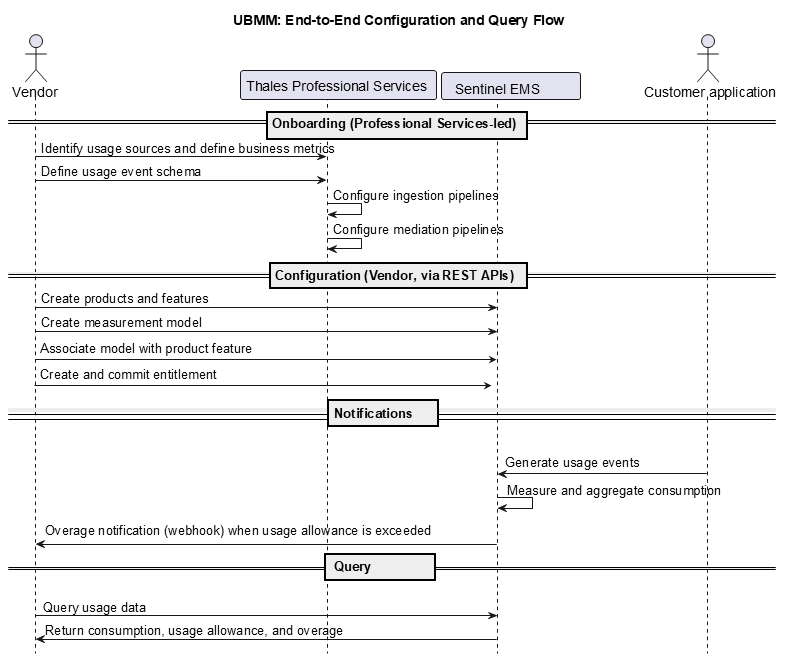
UBMM APIs
You configure and use UBMM through the Sentinel EMS REST APIs. UBMM is not available through the Sentinel EMS Vendor Portal in this release.
Measurement Model APIs
| API | Purpose |
|---|---|
| Add measurement model | Create a measurement model in the DRAFT or ENABLE state. |
| Search measurement models | Retrieve a list of measurement models that match the query parameters. |
| Get measurement model | Retrieve a specific measurement model. |
| Update measurement model | Update specific attributes of a measurement model. |
| Replace measurement model | Fully replace a measurement model definition. |
| Delete measurement model | Delete a measurement model in the DRAFT state. |
Measurement Model Association APIs
Use these APIs to associate product features to measurement models and to set the usage allowance and usage period:
| API | Purpose |
|---|---|
| Update association | Create or update measurement model associations for a product's features. |
| Search associations | Retrieve associations that match the query parameters. |
| Get association | Retrieve the associations configured for a specific product. |
| Replace association | Fully replace the existing associations for a product's features. |
| Remove association | Remove all measurement model associations for a product. |
Query APIs
Use the query APIs to retrieve usage data. UBMM provides two query APIs, each answering a different business question.
| API | Purpose |
|---|---|
| Query by measurement model |
Returns aggregated consumption calculated directly from usage events for a measurement model, grouped by a window size (HOUR, DAY, or MONTH). Use it to investigate raw usage patterns and trends for a measurement model, independently of product feature entitlements. For example, "What is the total Cloud SQL storage usage right now?" |
| Query by product key |
Returns consumption, usage allowance, and overage for a specific product feature within an entitlement, grouped by the configured usage period. Use it to determine remaining allowance and identify overages for a specific customer entitlement. For example,"Has this customer exceeded their monthly allowance, and how much do I bill them?" |
Choosing Between the Two Query APIs:
>Use query by measurement model when you want raw, model-level usage trends and flexible time-window grouping, without reference to a specific entitlement.
>Use query by product key when you want entitlement-level billing context, including the usage allowance and overage for a specific product feature.
NOTE The query by product key API does not return usage data for a product key in the CLOSE state. Retrieve any required usage data before you close the product key.
Webhook Notifications
UBMM uses webhooks to notify you when a product feature exceeds its configured usage allowance within a usage period. This lets you respond to overages in near real time, for example, to drive billing processes, alert internal teams, or update customer-facing dashboards.
When the notification is triggered
The system generates an overage notification when consumption exceeds the configured usage allowance for the usage period. The notification uses the following event and activity names:
>Event name: Consumption Exceeded Usage Allowance
>Activity name: Exceed Usage Allowance
What you can do
>Subscribe to the overage webhook to receive notifications automatically. For details, see Webhooks
>Configure your callout endpoint to receive and process the notification payload.
>Use the notification to trigger billing, alerting, or reporting workflows in your own systems.
NOTE Overage is informational only and triggers no enforcement action. Usage is not blocked when the allowance is exceeded.
Example for the "Consumption Exceeded Usage Allowance" Event:
{
"eventName":"Consumption Exceeded Usage Allowance",
"entityName":"Feature Usage Allowance",
"webhookId":"97c85926-6417-49fe-88cf-32569dbd17ee",
"webhookName":"overageTest",
"activityName":"Exceed Usage Allowance",
"requestId":"92f4cc85-6722-4a9c-9044-0982d323bc6c",
"eventId":"f03fd709-65e3-4e23-8aa0-1ac13f80b3da",
"url":https://api.example.com/ems/api/v5/measurementAggregationByProductKey/sample_productKey?featureId=sample_featureId&from=2026-08-03 10:52:00&to=2026-08-03 11:52:00,
"entityId":"b5b7b566-b66e-41ce-b48a-c6aeabd35433",
"currentState":"{\"timestamp\":\"2026-08-03T10:59:51.209485Z\",\"customerId\":\"\",\"productKey\":\"sample_productKey\",\"productId\":\"efba6914-ed83-465b-ba13-27753b9bfa11\",\"featureId\":\"sample_featureId\",\"measurementModel\":{\"id\":\"d1ee0b6c-3c79-4a6b-a83e-e8dfb247a9a4\",\"name\":\"mm_sample\",\"identifier\":\"mm_sample\",\"aggregationType\":\"COUNT\",\"eventType\":\"sample_event\",\"aggregationAttribute\":\"\"},\"usagePeriod\":\"HOUR\",\"usageInterval\":{\"from\":\"2026-08-03T10:52:00Z\",\"to\":\"2026-08-03T11:52:00Z\"},\"consumption\":4,\"usageAllowance\":3,\"overage\":1}",
"opDatetime":"2026-08-03 11:00:10.268"
}
Example: Metering API Usage for a Pay-As-You-Go Service
Consider a vendor that offers a cloud reporting service. The vendor wants to charge customers based on the number of report-generation API requests instead of selling a fixed number of licenses. The steps followed are:
| Example | Steps | Description |
|---|---|
| Define the Usage Event |
The vendor identifies report API requests as the usage activity to measure. Each API request generates a usage event that contains information about the customer, product, feature, and request. |
| Create the product and feature |
The vendor creates the product and the Report API feature whose usage will be measured, and associates the feature with the product. This establishes the product feature that the measurement model will later measure: >Product: Cloud Reporting Service; >Feature: Report API. |
|
Create a Measurement Model |
The vendor creates a measurement model that defines how Sentinel EMS calculates consumption from the usage events. It is based on a usage event source schema and specifies the event type, aggregation method, and other settings. >Event type: report_request; >Aggregation type: COUNT; >Unit: Requests; >Feature: Report API. This tells Sentinel EMS to count the number of report_request events received for the feature. |
| Associate the Measurement Model with a Feature |
The vendor associates the measurement model with the Report API feature and configures a usage allowance. >Feature: Report API >Measurement Model: Report API Requests >Usage Allowance:10,000 >Usage Period: Month |
| Create an entitlement | The vendor creates an entitlement for the customer using the product and feature associated with the measurement model, and then marks the entitlement as complete. By default, the entitlement uses the usage allowance and usage period configured on the association. |
| Monitor Consumption |
As customers use the service, Sentinel EMS calculates and aggregates feature consumption according to the associated measurement model. >Customer: customer123 >Usage Allowance: 10,000 requests >Consumption: 12,500 requests >Overage: 2,500 requests If consumption exceeds the usage allowance, Sentinel EMS calculates the overage and can generate an overage webhook notification. The overage is informational and does not block usage. |
Frequently Asked Questions
Is UBMM a self-service offering in Sentinel EMS?
No. Initial onboarding and configuration require Thales Professional Services engagement. After onboarding, you can create additional measurement models, associate measurement models with product features and assign the usage allowance and usage period per plan sold, subscribe to webhooks, update usage allowances, and query aggregated usage data independently.
Can I implement using Sentinel EMS Vendor Portal?
No. You need to use the Sentinel EMS REST APIs for implementation.
What types of usage can I measure?
You can measure any business metric that is relevant to your monetization model, such as API calls, transactions, storage consumed, or feature activations. You define what to measure in business terms, and Thales Professional Services translates that into the technical measurement configuration during onboarding.
Can a measurement model be used by multiple features?
Yes. A measurement model can be associated with multiple product feature combinations across one or more products.
What does a usage allowance of 0 mean?
When set to 0, the usage allowance is treated as unlimited. Consumption is still measured and available through the query APIs, but no threshold is enforced and no overage is calculated.
Can I configure entitlement-specific allowances?
Yes, if the measurement model association is configured to allow overrides. Otherwise, the usage allowance defined in the association applies to all entitlements for that product feature.
How do I know if a customer exceeded the allowed usage?
Use the query by product key endpoint to review consumption, usage allowance, and overage information for the product feature. You also receive an overage notification through a webhook when the allowance is exceeded.
Does UBMM change entitlement management?
No. Your existing entitlement management remains unchanged. It adds a consumption visibility layer that gives you insight into three key metrics per product feature: how much was used, how much was allowed, and how much was exceeded. This data is available through the query APIs, enabling you to monitor and act on usage without modifying your entitlement structure.