
Account Mapping
Sentinel Pulse shows insights for Microsoft Dynamics accounts by mapping Microsoft Dynamics accounts to customer names from Sentinel Platform. The Account Mapping page enables you to review the automatic mapping and, where an automatic mapping is not possible or must be replaced, to manually map customers. Manual mapping supersedes automatic mapping.
NOTE This page is visible only to Sentinel Pulse Administrator and Operations Users.
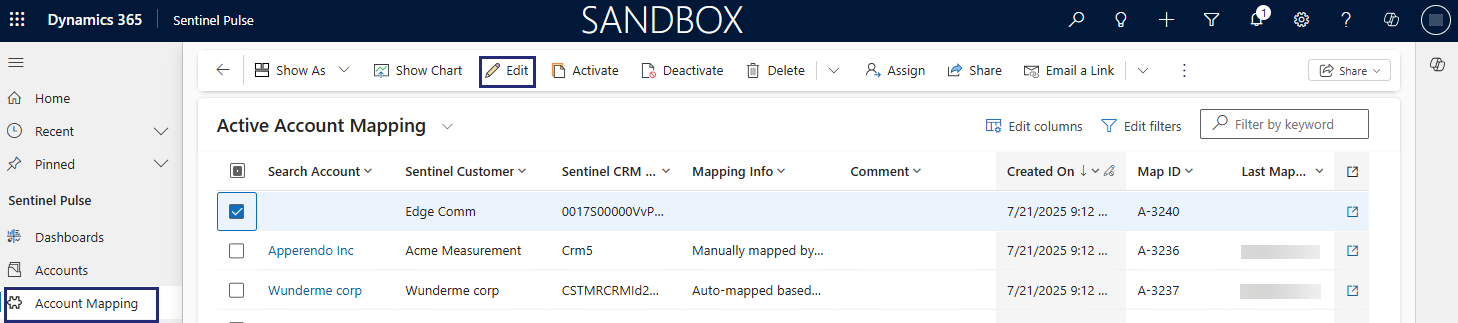
The following image illustrates account mapping in Sentinel Pulse.

The following table lists the data points available on the Account Mapping page:
| Header | Description |
|---|---|
| Search Account |
Name of the mapped account. You can: >Search for and manually map the relevant account. >Manually add an account. |
| Sentinel Customer | Name of the customer in the Sentinel Platform. |
| Sentinel CRM ID |
Account Number of the customer in Microsoft Dynamics environment updated into Sentinel EMS Customer object's CRM ID field in Sentinel Platform. |
| Mapping Info | The type of mapping done for the account. |
| Comment | Additional comments added by the user who mapped this account. |
| Created On | Date and time that the record was created in the Account Mapping page. |
|
Map ID |
A unique identifier for the record. |
| Last Mapped By (Formula) | Name of the person who mapped this account most recently and when. |
| Last Modified By | Name of the person who modified the account most recently. |
| Last Modified Date | Last modification date of the record. |
Automatic Account Mapping
The Account Mapping feature automatically maps Microsoft Dynamics accounts to customer records in Sentinel Platform when the Microsoft Dynamics account number is available in the Sentinel EMS Customer object's CRM ID field. If the account number is not available, the feature maps Microsoft Dynamics Account names to Sentinel EMS Customer names, which are case-sensitive.
If you want Sentinel Pulse to automatically map accounts using a different field other than Account Number, see Configure Account Mapping.
Manual Account Mapping
A Microsoft Dynamics Administrator or a Sentinel Pulse Sales Operations user has the ability to map records which were unmapped or override an automatically mapped record.

To manually map an account in Sentinel Pulse from the Account Mapping page:
1. In the Search Account column, click a row where the account name is blank.
2.Click  Edit to add an account.
3.In the Search Account field, select an existing account from the list displayed or click  New to add a new account.
4.Click Save to save your changes.
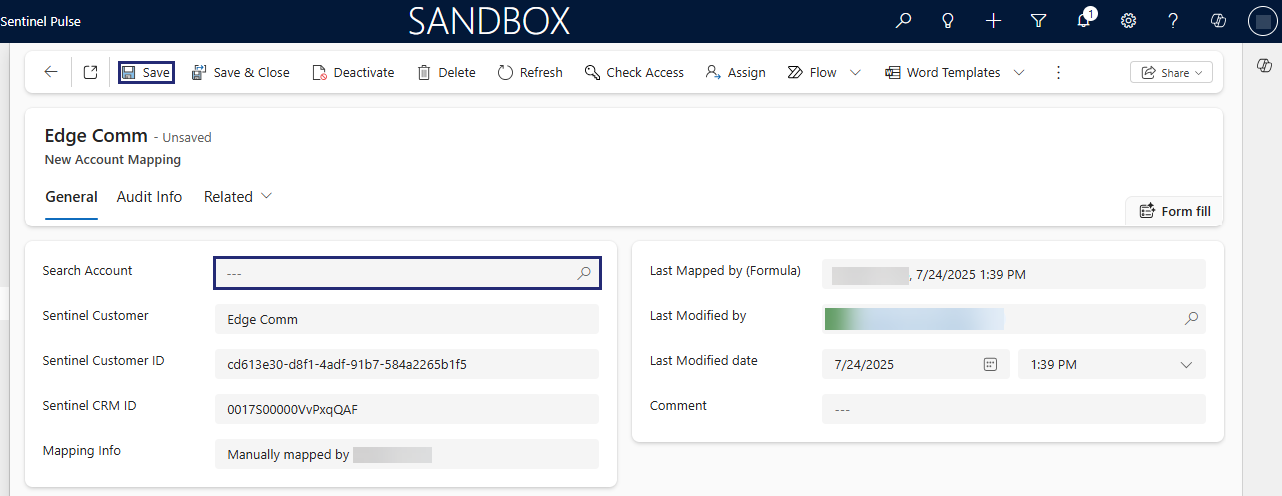
The following image result after some manual mapping:
