
Configure Account Mapping
The Account ID is the default field used to map customer records in the Sentinel Platform with corresponding Microsoft Dynamics accounts. However, there may be a case when you want to use another field to uniquely identify an account instead of the Account ID. For example, if accounts were imported into Microsoft Dynamics from another CRM system and you want to maintain the other CRM's identifier as the master customer reference data.
To change the default mapping logic in Sentinel Pulse, you can use the Configure Account Mapping in the Admin Configuration tab. The Account Mapping Criteria section lets you select a different field and apply this as the new default for mapping accounts in Sentinel Pulse.
The following sections describe how to configure account mapping:
Prerequisites
The user must have administrator rights in Microsoft Dynamics.
Configuring Account Mapping
You can add a new criteria to map accounts from the Active Account Mapping Setup page. The following steps illustrates an example to add a new criteria for account mapping using Account Name (name) parameter:
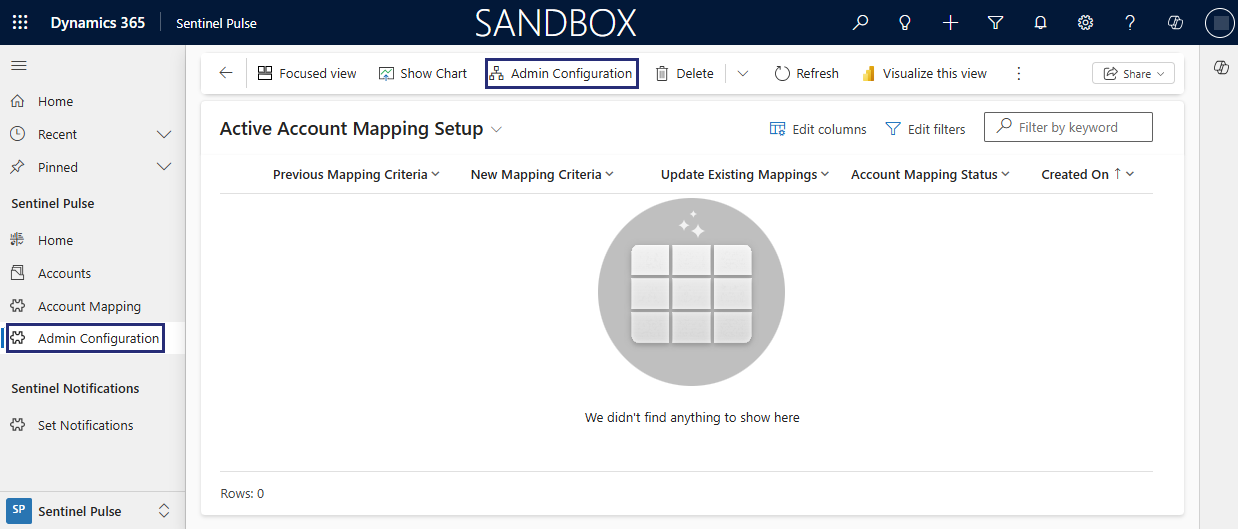
1.In the left navigation pane, select Admin Configuration. The Active Account Mapping Setup page opens.
2.From the top toolbar, select Admin Configuration.
3.The Admin Configuration page is displayed viewing the Existing Mapping Criteria in read only .
4.Select Account Name (name) from the list available in New Mapping Criteria field to use for mapping accounts.
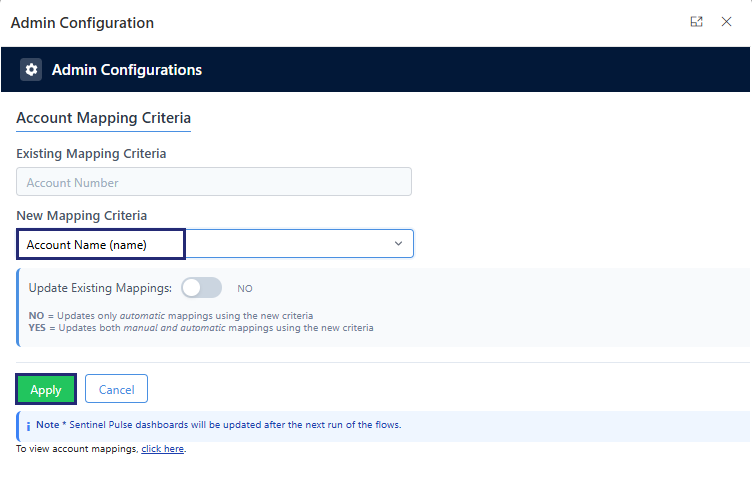
5.In Update Existing Mappings, select Yes or No to decide how existing mappings are handled. The default setting is No.
•No: Removes only the automatic mappings and creates new ones based on the selected field. Any manual mapping performed by Microsoft Dynamics Admin or Sales Operations are not removed.
•Yes: Removes all mappings—both automatic and manual—and creates new automatic ones based on the selected field. Be careful—any manual mappings you had earlier set up will be lost.
6.Click Apply. The Active Account Mapping Setup screen shows the Account Mapping Status as Complete.

The Account Mapping page displays the account mapped with the Account Name (name) field used for mapping:
