
Namespaces
|
>
|
New to Sentinel EMS?
|
What Is a Namespace?
A namespace acts as a logical partition for your Sentinel EMS workspace, enabling you to maintain separate “storage locations” for each of your product lines by business unit or geographical locations, and so on. This enables you to group products and features together. For example, you may want to use namespaces to group catalog entities and manage permissions. You can associate one or more namespaces with each of your market groups.
If you have multiple namespaces, the entities in each namespace, such as features and products, are available only to those users who have permissions for that namespace. If you want to add a feature
Entitlements transcend namespaces and can contain products
Namespaces are for your internal use and are not exposed to end users.
 Thales provides a default, out-of-the-box namespace that represents your company's unique batch code. You must retain the default namespace, but you are not required to use it. You can create and use your own, custom-defined namespaces as needed. The namespace for Sentinel protection keys with a demo vendor code is DEMOMA.
 Namespaces for Feature Flag Management Platforms
The features driven by feature flag management platforms are created using the pre-seeded Feature-Flag namespace. You must not delete or rename this namespace. Otherwise, you will not be able to restore existing feature flag data in Sentinel EMS.
Prerequisites for Creating a Namespace
You must have administrative rights in Sentinel EMS.
Creating a Namespace
You create a namespace from the Namespaces page.
To create a namespace:
1.From the navigation pane, select Catalog > Namespaces to view the Namespaces page.
2.Click the Add Namespace button.
3.Fill in the namespace attributes.
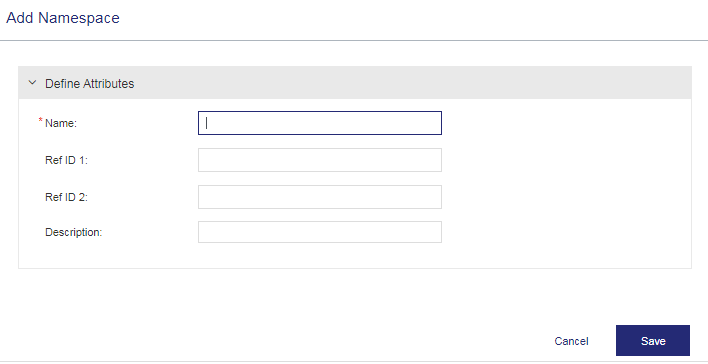
4.Save the namespace. Then do the following:
•Specify permissions for the namespace users as needed. For details, see Vendor Users and Roles.
•Associate the namespace with the relevant market groups as needed. For details, see Market Groups.
Namespace Attributes
The following table explains the namespace attributes:
| Attributes | Description | Required/Optional | Valid Values |
|---|---|---|---|
| Name | Name of the namespace. The validity of the namespace name depends on the enforcement in use. | Required |
>1 to 200 characters >Alphanumeric >Must be unique |
| Ref ID 1 | Reference identifier that identifies the namespace in an external system. | Optional |
>0 to 100 characters >Alphanumeric |
| Ref ID 2 | Reference identifier that identifies the namespace in an external system. | Optional |
>0 to 100 characters >Alphanumeric |
| Description | Additional information about the namespace. | Optional |
>0 to 500 characters >Alphanumeric |
Actions for Namespaces
The following table lists the actions available for namespaces:
| Action | Description | |
|---|---|---|

|
Edit |
Updates existing namespace information. For details on editing namespaces, see Editing an Entity. Note: You can modify all attributes irrespective of the deployment status of a namespace. A namespace is considered "deployed" when it is used in an entitlement. |

|
Delete |
Deletes the namespace. See Deleting an Entity to understand how to delete a namespace. Note: >
>You cannot delete deployed namespaces. >Before deleting a namespace, you must remove all associated products and features. If any product or feature remains, Sentinel EMS displays an internal error. To fix this, ensure that no products or features remain in the namespace and try deleting again. >
|