
Provisioning Methods
Prerequisites for Adding a Method
A role that includes Catalog (Namespace) permissions for the relevant namespace. At minimum, the vendor user needs the permission. For details, see Roles.
Adding a Method
A method defines how the provisioning request is sent to the provisioning system after a product is activated. You can add a new method that can be associated with a provisioning-enabled product.
To add a new method:
1.From the navigation pane, select Provisioning > Methods.
2.Click Add Method.The Add Method page opens.
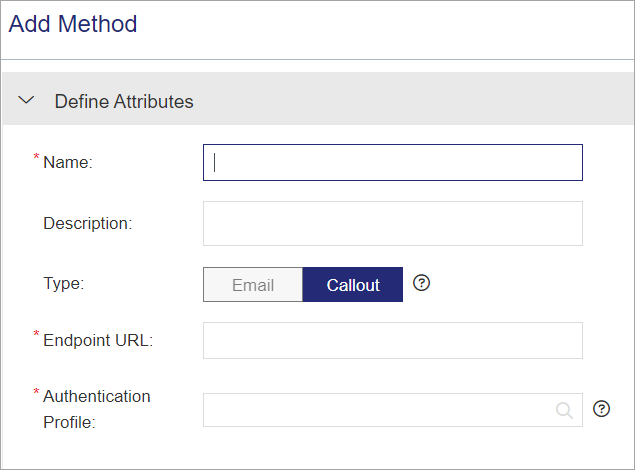
3.Define the Common Method Attributes and either the Callout Attributes or Email Attributes.
4.Click Save.
Common Method Attributes
The attributes in the following table apply to both Callout Attributes and Email Attributes:
| Attribute | Description | Required/Optional | Valid Values |
|---|---|---|---|
| Name | Friendly name that identifies the method. | Required |
>1 to 50 characters >Special characters allowed: , ! @ # $ ^ * ( ) + = ` [ ] { } ; ' : ? , . / * - + / | \ @ ? * : ; ^ ` ' ; ^ { } [ ] |
| Type |
Type of provisioning request: >Callout: Calls an API or a web service to process the provisioning request based on the callout attributes. Use callout provisioning for fully automated, API-based integrations suited to high-volume or enterprise workflows. >Email: Automatically triggers an email upon activation of provisioning-enabled products, based on the configured email attributes and provisioning request email template. Use email provisioning when automation is limited, manual validation is required, or the provisioning system does not support API integration—best for low-volume or controlled setups. |
Required | Callout or Email |
| Description | Additional information about the method. | Optional |
0 to 500 characters |
Callout Attributes
Refer to the screen shown in Adding a Method.
| Attribute | Description | Required/Optional | Valid Values |
|---|---|---|---|
| Endpoint URL | URL of the recipient provisioning service. | Required |
>0 to 2000 characters >Supported protocols: •https •http • www |
| Authentication Profile |
Select the authentication profile of the recipient from the list. For more details, see Authentication Profiles |
Required |
1 to 50 characters |
Email Attributes
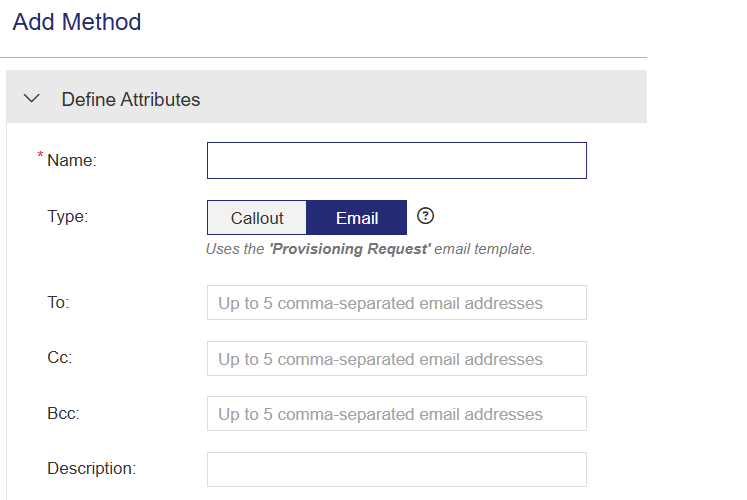
| Attribute | Description | Required/Optional | Valid Values |
|---|---|---|---|
| To |
Primary recipient email addresses that receive the provisioning notification. |
Optional when defining a method, but required during provisioning association. |
0 to 5 comma-separated email addresses |
| Cc |
Additional recipient email addresses that receive a copy of the provisioning notification. |
Optional | |
| Bcc | Additional recipient email addresses that receive a blind copy of the provisioning notification. | Optional |
NOTE Email addresses specified at the provisioning method level are carried over to the provisioning association level. You can modify the list at the association level by adding or removing addresses. Changes made at the association level in the original email list are not reflected at the method level.
Actions for Provisioning Methods
The following table lists the actions available for methods.
| Action | Description | |
|---|---|---|

|
Edit |
Enables you to edit the attributes of an existing method. However, you cannot change the type of an existing provisioning method. When you update a method, all requests processed after the update use the new method attributes. For more details, see Editing an Entity. |

|
Copy |
Duplicates an existing method, enabling you to edit the copy and create a new method. |

|
Delete |
Deletes the selected method. Note: You cannot delete a method that is associated with a product. |