
Features
|
>Prerequisites for Creating a Feature |
New to Sentinel EMS?
|
What Is a Feature?
A feature is a distinct functionality in a software application that can be independently licensed. Features are the basic building blocks
A feature can represent anything from a module to specific functionality such as Print, Save, or Draw, or an entire application.
For example, suppose you want to create a product called MySampleCalculator. You might include the following features:
| F1 | Add |
| F2 | Subtract |
| F3 | Multiply |
| F4 | Divide |
As part of your product monetization model, you might roll out the following flavors of the same product to the market:
>MySimpleCalculator (Add, Subtract)
>MyAdvancedCalculator (Add, Subtract, Multiply, Divide)
This lets you charge different prices according to feature usage.
Licensing Features
Sentinel EMS provides you the flexibility to apply a license model to each feature in a product. This helps to secure each feature and enables you to generate different types of licenses for a product according to your requirements.
You apply license models at different stages, depending on the enforcement:
>


 If you plan to secure a feature with Sentinel RMS, Sentinel Fit, Services, or a third-party enforcement, you can apply the license model when creating or editing the feature, when adding the feature to a product, or when adding the product to an entitlement.
>
 If you plan to secure a feature with Sentinel LDK, you can apply the license model when creating or editing the product that contains the feature, or when adding the product to an entitlement.
Prerequisites for Creating a Feature
>A role that includes Catalog (Namespace) permissions for the relevant namespace.
Lifecycle Stages of a Feature
The Deployed attribute defines the lifecycle stage of a feature. A feature's lifecycle contains the following stages:
>Deployed: The feature is included in a product that is part of an entitlement.
>Not Deployed: The feature is not deployed if:
•The feature is not included in any product, OR
•The feature is included in a product that is marked as a draft, OR
•None of the products containing the feature are included in any entitlements.
Feature Status
The Status attribute on the Features page indicates whether the feature is active or obsolete.
Possible values:
>Completed: The feature is active. You can create products using this feature.
>End of Life: The feature is obsolete. You cannot edit or delete the feature, or associate it with any product. You can mark a feature as End of Life when it is no longer sellable to customers. You can change the status back to Completed to make the feature available again, if needed.
When you first create a feature, the status of the feature is set to Completed.
Creating a Feature
You create a feature from the Features page.
To create a feature:
1.From the navigation pane, select Catalog > Features to view the Features page.
2.Click the Add Feature button.
3.Fill in the feature attributes as shown in the following example.
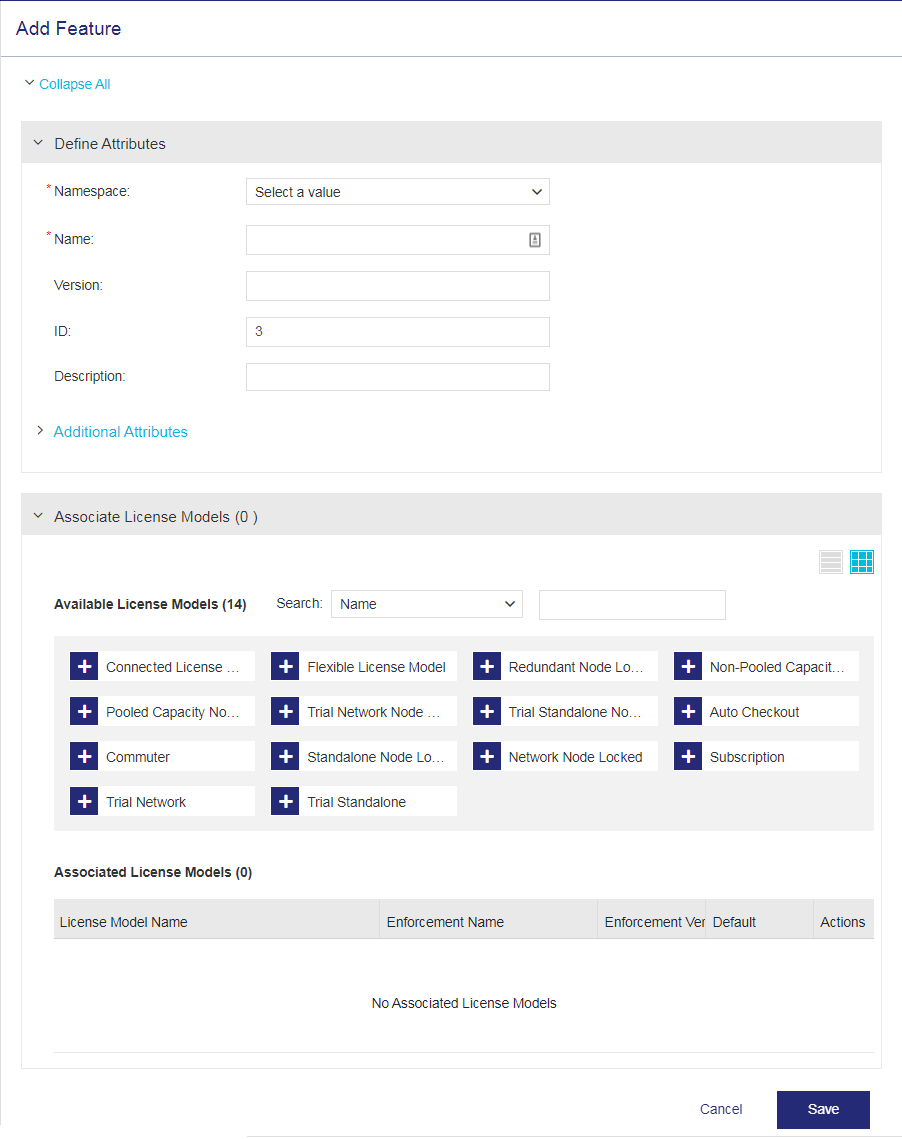
Important
Some points to remember when defining the feature attributes:
>Duplicate "name + version" combination is not allowed for features within the same namespace in Sentinel EMS.
>For cloud-served licenses, it is recommended not to have the same "name + version" combination for features across multiple namespaces.
4.
Associate and configure the feature's license models.
5.Click Save.
Feature Attributes
The following table explains the feature attributes:
| Attribute | Description | Required/Optional | Valid Values |
|---|---|---|---|
|
Namespace (Visible only if more than one namespace is available.) |
The namespace in which the feature is stored. |
Required |
Any namespace in the list |
| Name |
Name of the feature. The validity of the feature name depends on the enforcement in use. |
Required |
>
>
>
>
>
>
>
>
>
>
|
|
Version
|
Version of the feature. |
Optional |
>
>
For cloud-served and cloud-connected entitlements, cannot contain: spaces and ! # % ^ [ ] < > & $ >
>
>
>
>
>
|
| Identifier |
Unique identifier for the feature.
|
Required >
>
>
Optional for: >
|
>
>
>
>
>Must be unique |
| Description | Additional information about the feature. | Optional |
>0 to 500 characters |
|
Additional Attributes |
|||
| External ID | External reference identifier that uniquely identifies the feature in an external system. | Optional |
>0 to 60 characters >Unique across Sentinel EMS for all features. |
| Ref ID 1 |
Reference identifier that identifies the feature in an external system. For example, a feature code in your company's ERP system. |
Optional |
>0 to 100 characters |
| Ref ID 2 |
Reference identifier that identifies the feature in an external system. |
Optional |
>0 to 100 characters |
License Models
NOTE FOR SENTINEL LDK: Although you may see the Associate License Models pane when creating a feature, this pane is relevant only for features that use Sentinel RMS, Sentinel Fit, Services, and third-party enforcements. For features that use Sentinel LDK enforcement, you specify the license model when you create a product (or when you create an entitlement, if Define in Entitlement is selected when creating a product).
After providing the attribute details, you can use the Associate License Models pane displayed below to associate one or more license models with the feature you are creating.
You must associate at least one license model with a feature to include that feature in a product. You can apply a license model when creating or editing a feature, or when adding a feature to a product. If you do not want to associate a specific license model at this stage, you can configure the license model as Define in Entitlement while creating a product. This enables the order taker to set the license model when creating an entitlement.
When creating entitlements, only associated license models are available. Associating multiple license models with a feature provides the flexibility of selecting the relevant license model later when creating entitlements for your customers.

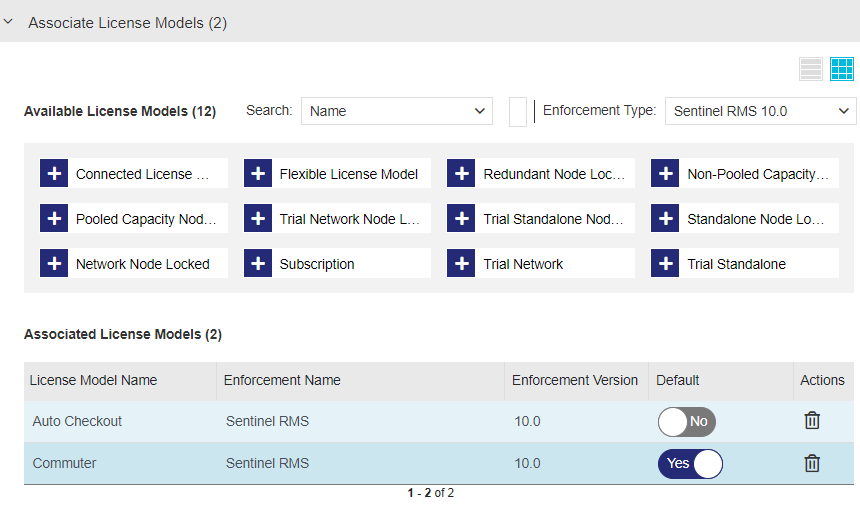
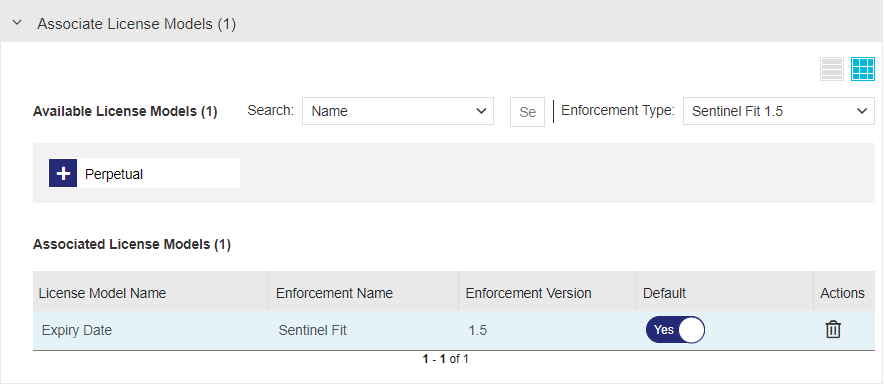
NOTE Enforcement Type is displayed only if more than one enforcement type is available.
The following table describes the associated license model attributes:
| Item | Description |
|---|---|
| License Model Name |
The name of the associated license model. |
| Enforcement Name |
The name of the enforcement, for example Sentinel RMS |
| Enforcement Version | The version of the enforcement, for example 10.2 |
| Default |
The default license model for this feature. When you create a product or entitlement, the default license model is automatically applied to the associated feature, simplifying the product and entitlement creation process. If needed, you can select another license model from the list of associated license models (instead of the default license model). Required: Yes, if more than one license model is associated with a feature. If only one license model is selected, changing this value has no effect. Possible values: Yes or No |
| Actions | The actions you can perform on the license model line item. |
Actions for Features
The following table lists the actions available for features:
| Action | Description | |
|---|---|---|

|
Edit |
Updates information for an existing feature. Note: >Modifying a feature requires appropriate permissions. For details, see Roles. >For completed features that are not deployed or activated, you can edit all feature attributes except the namespace. >For deployed features, you cannot modify the namespace or feature name; all other attributes are editable. >For activated features, you cannot modify the namespace, feature name >
|

|
Copy | Duplicates an existing feature to create an identical copy. Edit the attributes as needed and save to create the new feature. |

|
End of Life |
Marks a feature as End of Life, making it obsolete. Note: >You cannot edit or delete an End of Life feature. >You cannot associate an End of Life feature with any product. >You can restore an End of Life feature by marking it as Complete |

|
Complete | Restores a feature that was marked as End of Life, making it available for products again. |

|
Delete |
Deletes a feature. Available only for completed and non-deployed features. |